Measure Vibrations With Scientific Accuracy
Turn your phone into a professional seismograph that detects and measures vibrations, earthquakes, and tremors using internationally recognized Mercalli and Richter scales. Get the proof you need when others can't feel what you're experiencing.
Why Thousands Trust This Vibration Detector
Instant Vibration Detection
Measure any vibration in real-time using your phone's sensors. Whether it's a small tremor or strong shaking, get immediate readings that show exactly what's happening around you.
Professional Measurement Standards
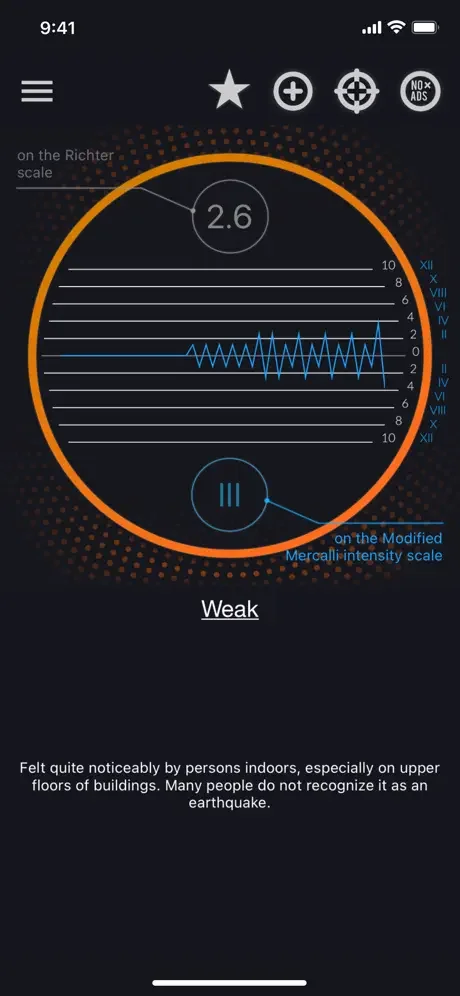
View results on both the Mercalli intensity scale and Richter scale – the same scientific standards used by seismologists worldwide. Understand vibration severity with measurements you can trust.
Document and Prove Vibrations
Finally get concrete evidence of vibrations that others might not feel. Perfect for addressing noise complaints with neighbors or documenting property issues with clear, scientific data.
Quick and Easy Calibration
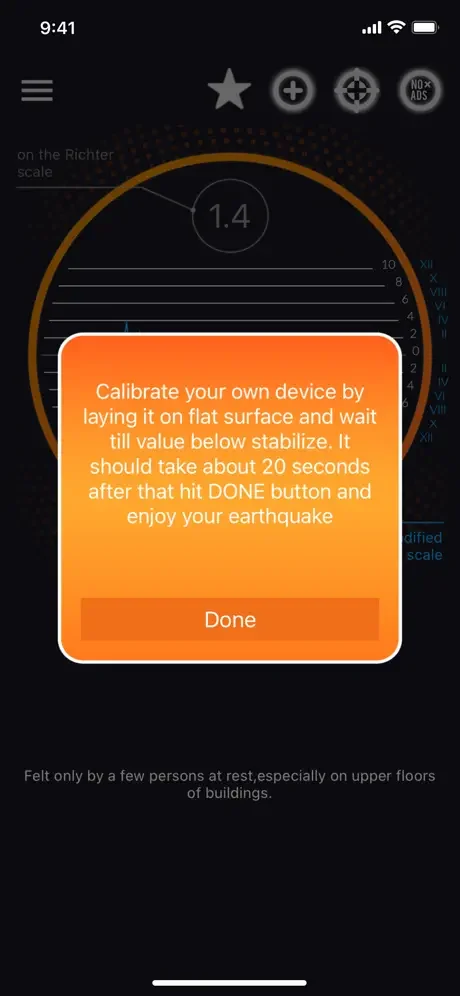
Get accurate results in just 20 seconds. Simply place your phone on a flat surface, let the app calibrate, and start measuring. No complex setup or technical knowledge required.
About
Vibration Meter
Vibration Meter is a free app that can measure the vibration (seismograph, body tremor, seismometer).
This app uses phone sensors to measure vibration or the earthquake, and it shows a reference as a seismic detector. Using this app, you can check vibrations both on the Richter scale and on the modified Mercalli intensity scale.
To calibrate application click on the button - Calibrate, put your device on the flat surface and wait till value stabilize. It should take about 20 seconds. After that click OK button and enjoy the earthquake!
App shows reference to earthquake vibrations as classified by internationally used Mercalli intensity scale for seismic activities such as earthquakes. The Mercalli intensity scale is a seismic scale used for measuring the intensity of an earthquake. It measures the effects of an earthquake. Vibration Meter can also be called seismograph or seismometer when used for measuring seismic activity.
Mercalli intensity scale:
- I. Instrumental - Not felt. Recorded by seismographs.
- II. Weak - Felt only on top floors of high buildings.
- III. Slight - Felt indoors, like a passing light truck.
- IV. Moderate - Windows, doors rattle. Like passing train.
- V. Rather Strong - Felt by all. Small objects upset.
- VI. Strong - Books off shelves. Trees shake. Damage.
- VII. Very Strong - Difficult to stand. Buildings damaged.
- VIII. Destructive - Significant damage. Trees broken.
- IX. Violent - General panic. Serious damage. Cracks.
- X. Intense - Most buildings destroyed. Rails bent.
- XI. Extreme - Rails bent greatly. Pipelines destroyed.
- XII. Catastrophic - Near total damage.
Some countries use Richter scale instead of Mercalli scale. The Richter scale is a base-10 logarithmic scale, which defines magnitude as the logarithm of the ratio of the amplitude of the seismic waves to an arbitrary, minor amplitude.
Check the vibrations with you phone!
SMART VIBRATION METER terms of service
- 1 week Meter + from 4.99$ per week (prices may vary slightly depending on the region).
- 1 month Meter + from 19.99$ per month (prices may vary slightly depending on the region)
You can find all in-app purchases on this app store page below under "In-app purchases".
Subscriptions are automatically renewed unless they have been switched off at least 24 hours before the subscription period expires. Your account will be charged within 24 hours of payment. You can manage your subscriptions in the iOS settings and switch the automatic renewal on or off. A subscription that is already running cannot be canceled within the term that has already started.
Privacy Policy: https://zipoapps.com/vibrationmeterios/privacy
Terms of Use: https://zipoapps.com/vibrationmeterios/terms
See the App in Action
Real People, Real Results
I was either losing my mind, or my walls and floor were vibrating for hours at a time from my new neighbor listening to house music at all hours. This app actually allowed me to track the 1.6 earthquake-like vibration coming from their subwoofer and gave me the information needed to help put a stop to it, and regain my sanity. Thank you!
Thanks for helping me conferm I am feeling vibrations Some people can’t feel pity no one was doing anything about it because of your device clearly show them what shaking on this property