Transform Your Calls Into iPhone Style
Stop settling for boring call screens. iCallScreen brings premium iPhone elegance to your Android device with stunning customization, smart call management, and the satisfying slide-to-answer experience you've been missing.
Everything You Need for Perfect Calls
Customize Every Detail
Make your call screen truly yours with custom wallpapers and ringtones for each contact. Choose from beautiful themes or use your own photos to create a calling experience that matches your style and personality.
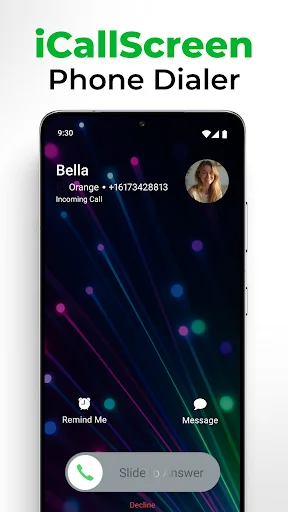
Slide to Answer Calls
Enjoy the premium iPhone-style gesture that makes answering calls smooth and satisfying. No more accidental answers or fumbling with buttons – just an elegant slide that feels natural and looks beautiful.
Block Spam and Stay Organized
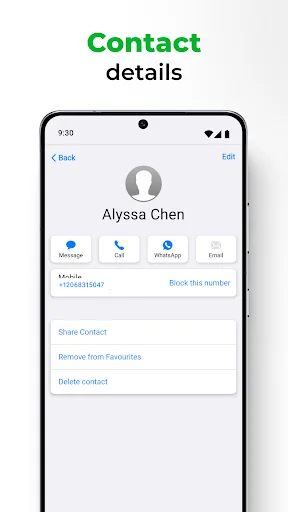
Take control with built-in call blocking to stop unwanted calls instantly. Manage your contacts, recent calls, and favorites with ease using the smart T9 search that helps you find anyone in seconds.
Never Miss Important Calls
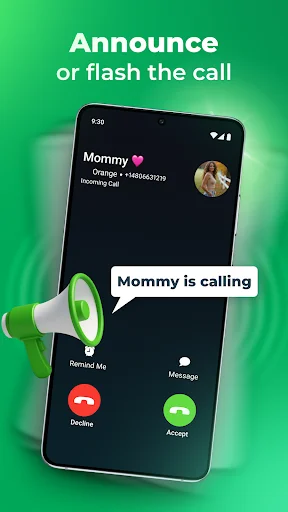
Let your phone announce caller names so you know who's calling without looking. Get flash alerts for incoming calls, manage dual-SIM cards effortlessly, and enjoy dark mode to save battery while looking great.
About
iCallScreen - Phone Dialer | Fresh and Unique Style
Are you feeling bored with the old-style caller screen? We will bring you iCallScreen - Phone Dialer | fresh and unique style. This caller screen app has a contacts list, recent list, favorite list, and dialer T9 search keypad.
Cool iCallScreen Features
You can personalize your Phone Dialer / Dialpad easily! Slide to answer the call, change Call Screen backgrounds, change ringtones, block - unblock users, and sim card preference. Enjoy the full screen caller ID, dialer and dial pad new unique style on your Android device.
Fantastic Features of iCallScreen - Phone Dialer
Set Custom Wallpapers or Backgrounds
Customize and decorate wallpaper of background for the call screen.
Set Custom Ringtones
It allows you to set fantastic custom ringtones. Customize your caller screen and ringtones per contact.
Call Block
It allows you to block unwanted or spam calls.
Phone Dialer
There are many features in the dial pad app:
- Search or manage a smooth contacts book.
- See recent calls history.
- Add and remove contacts in favorites.
- The advanced dialer T9 keypad allows users to search and see the contact detail.
Customization Settings
There are many settings like changing wallpapers and ringtones, blocker, swap accepts, and decline buttons for incoming ↘ and outgoing ↗ call screen.
Call Screen
Enjoy all the fantastic features that the call answering screen app provides. Jump on a conference call or customize your phone dialer screen. It's up to you.
Slide to Answer Button
Everyone wants the "slide to answer button." The iCallScreen app, with this functionality, gives you a unique feel when answering your phone.
Dual-SIM Support
The app supports a dual sim card. So a user can manage SIM settings and choose a sim card before a call or set a default sim.
Caller Name Announcer
There's no need to look at your phone or dial pad. It can announce the name or the number of your caller.
Fake Call
Schedule a fake call with a custom contact name, mobile number, and ringtone.
Flash on Call
Blink a flashlight while the incoming call rings and adjust flash preference as per your preference.
Dark Mode
The dark mode option is available to optimize battery life. Customize the dialpad with your preferred color.
Lightweight
The app wouldn't take much space on your device. Enjoy a custom dial pad on any device!
Call Back Screen
After hanging up, the call, call back screens comes for you to recall, send a message, block, or make a note of calls.
Manage Conference
You can merge two or more calls, manage the conference, and split the calls if needed.
Discover the fantastic Phone Dialer / Dialpad today!
Call Log Access: The app requires access to your call history to provide enhanced call management features. This allows users to view, manage, and organize their call logs directly within the app, ensuring seamless communication management.
Default Phone Handler Functionality: it is required to set the iCall app as their default phone app, we provide comprehensive call handling features, including writing and showing call history within the dialer interface.
Default Dialer Permission: The app requires DEFAULT_DIALER permission to provide users with a seamless experience when managing calls. By setting iCall as the default dialer, users can enjoy a fully integrated calling experience with custom themes, advanced call handling, and the ability to manage all calls directly through the app.
Call History Access: With the CALL_HISTORY_DIALER permission, the app can access and display your call history within the dialer interface. This feature is essential for users to view, organize, and manage their call logs, ensuring a comprehensive and user-friendly communication management experience.
See the Beautiful Difference for Yourself



Join 10 Million Happy Users Worldwide
Because it helps me call my friends and family i would have not called them without this app and i rellay think that this is want chilldren should get to contact their family or friends. You should look at this app download it and try it out. Also looks like an iphone and also sounds like an iphone. This app is rhe one i only call people and it goes by alphabet and it really helps out alot and this app will make more easir to find who you need to call. Also it shows you who you got a miss call!!
Currently, users are filling boring with new old-style caller screens so we bring you iCallScreen - OS14 Phone X Dialer Call Screen for you. In this full screen caller id, you can get the same filling like you are using phone X or OS 14 device. In this caller screen app has contacts list, recent list, favorite list, and dialer T9 search keypad. There are also many settings for the slide to answer callscreen like swap accept and decline button, change colorful backgrounds, change ringtones, block
This is the only application that solves the very annoying problem well documented in the Android community of being unable to find a control on the screen to answer the phone when ringing under certain use conditions. This always presents the answer button. There's so much more to this, but that alone is worth it.
HONESTLY, ALL I CAN BOLDLY COMMENT IS is : "MY SINCERE APPRECIATION TO THE DEVELOPERS". FROM THE DEEP INSIDE MY HEART : " THANKS DEVELOPERS" This is one of the Excellent Iphone Style Dialers on Android , Users Friendly, Safe and clean Features. I highly recommend it, no regrets. Thanks. I really Appreciate.
Well I don't really use it openly more than I need because of different reasons, I am going to say that when I do I am am able to say but also show my feeling and how help with no worry about from hear to way over where I am in person feel better seeing and making sure of that is more important than enough,
Work as phn dialer but ads are annoying + extra click to close app + confirm close app, WOW, because 1 ad pre dial, 1 ad post dial, + u have to confirm exit so that's open dialer, close ad, dial, hang up, close ad. Close app, Confirm. So if u like clicking th x button this is an app ull luv.