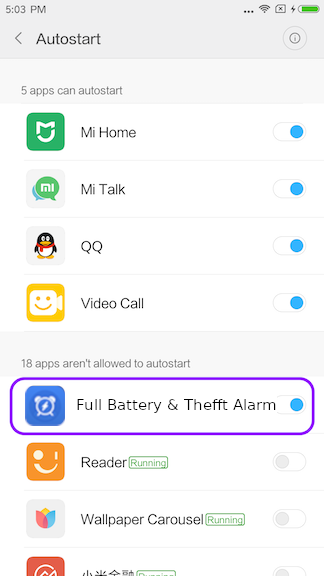
How to manage Autostart service on the Xiaomi devices
Have you ever experience about not receiving email messages on the Xiaomi devices? This issue may be related
to background services.
In general, if background services are stopped without any notification on
the Android devices, they should be automatically started again by default. However, unfortunately
Autostart function of background services on the xiamoi devices are
set to off by default. If you do not
receive email messages on the Xiaomi devices, please check out whether Autostart is enabled or not. To get email messages on your
Xiaomi device, please make sure that Autostart function should be
enabled.
If you want to allow Xiaomi device to enable Autostart service, please refer to the following steps.
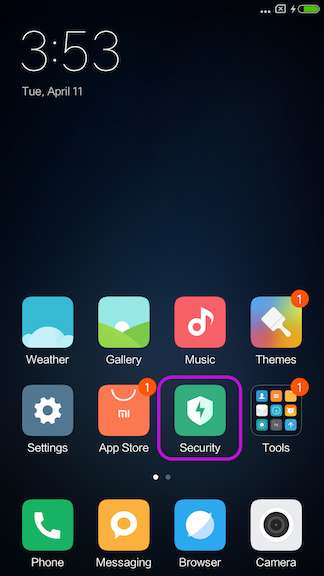
1. Open the Security menu on your Xiaomi device.
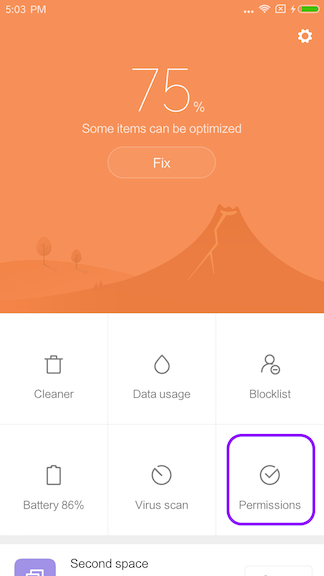
2. Tap Permissions.
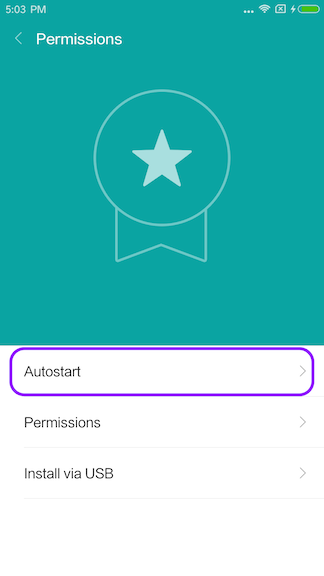
3. Tap Autostart.
4. Swipe to enable Autostart for Full Battery & Theft Alarm.