How to turn off battery optimization on the Google Android 6, 7 and 8 devices
Have you ever experience about delay in receiving email messages or slower synchronization?
This issue may
caused by Doze feature. If you want to know about Doze
feature, please refer to the following link.
To turn off optimization function in battery optimization, please refer to the following steps.
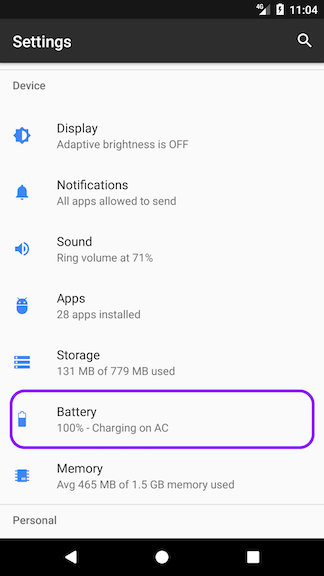
1. Open the Settings menu on your device and tap Battery.
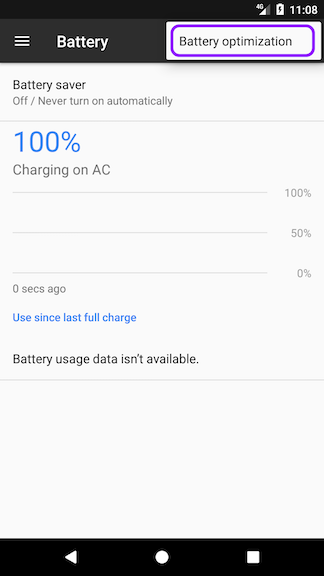
2. Tap the more button on the action bar at the top right, and choose Battery optimization.
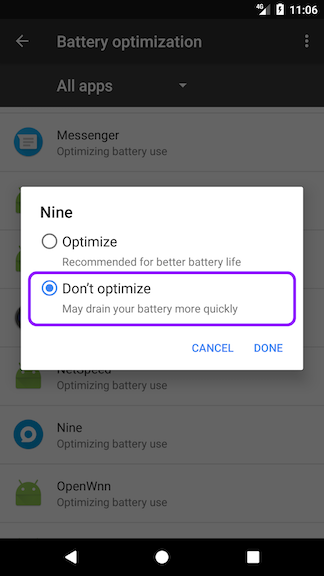
3. On the Battery optimization screen, switch to the All apps list from the drop-down to see all of the apps on your device. Tap Full Battery & Theft Alarm from the menu and choose Don’t optimize to exclude Full Battery & Theft Alarm from the Doze feature. Please note that Full Battery & Theft Alarm is no longer affected from Doze feature.